One Window, Every Linux
I run PowerShell on Windows, two WSL distros, and a couple of remote Linux boxes, with coding agents working in all of them. Herdr turned that sprawl into one sidebar and one agent list. The trick is to stop treating WSL as a terminal and start treating every distro as a machine.
Contents
I have four Linuxes and one keyboard.
For a long time that meant four windows, a dozen tabs, and a habit of clicking through all of them every few minutes to find out which agent was waiting on me.
The Terminal Commute Moved Onto My Desk
In WSL Is Not Optional I argued that the modern toolchain assumes Linux, and that making developers commute to a jumphost to get it quietly taxes their attention. I still believe that. What I did not expect is that once you get Linux onto the laptop, the commute comes back in a smaller form. Now it runs between terminals.
Here is my actual setup at home. Windows 11 is the host, because that is where the browser, Office, and the hardware drivers live. PowerShell 7 is the shell I use for anything Windows-shaped. Ubuntu in WSL is where most of my code lives. A second distro, Debian, is the clean room I use when I want to know whether something works without my dotfiles. Then there is a small Linux box in the closet and a cloud VM that runs the long jobs.
Coding agents run in at least three of those places on any given evening. One is refactoring in Ubuntu. One is grinding through a test suite on the VM. One is waiting for an answer in Debian, and that one is the problem, because I will not notice it for twenty minutes.
None of these environments is hard on its own. The cost is the switching. Every hop means finding the right window, remembering which tab holds which session, and reattaching to whatever survived the last reboot. And the most expensive question of the evening, who needs me right now?, has no single place where I can see the answer.
What Herdr Actually Is
Herdr (opens in new tab) describes itself as “the runtime your coding agents live on.” Underneath, it is a terminal multiplexer written in Rust and released under Apache 2.0. You get workspaces, tabs, and tiled panes, and the panes are real terminal processes (opens in new tab), not some rewritten view of an agent. A background server owns those processes, so closing the window leaves everything running.
What makes it more than tmux with nicer colors is that it reads each pane and works out what the agent inside is doing: working, blocked, done, or idle. A workspace in the background changes its marker when its agent finishes or gets stuck.
Two things turned it from a curiosity into my daily driver. First, it runs natively on Windows. Second, it can put several machines in one window.
PowerShell Stays Home
I did not want a tool that treats Windows as a place you leave as quickly as possible. On Windows, Herdr opens new panes in pwsh.exe when PowerShell 7 is on the PATH, and falls back to the built-in powershell.exe otherwise. Config lives in %APPDATA%\herdr\config.toml. Notifications go to the Windows notification center, and clicking one takes you back to the pane that raised it.
So “Local” in my sidebar is Windows, and that is deliberate. Winget, Azure CLI sessions, scripts that touch the registry, anything that needs to see the real file system: all of it stays where it belongs. I stopped pretending that every task is a Linux task. Some are Windows tasks, and they now sit one row away from everything else.
Every Distro Is a Machine
This is the part I am most pleased with, and it is my own pattern. Herdr’s documentation never mentions WSL.
The obvious approach is to open a Windows pane and type wsl -d Ubuntu. That works, but it leaves Windows doing the watching. Agent detection and session persistence then live on the Windows side of the boundary, one layer away from the processes they are supposed to understand.
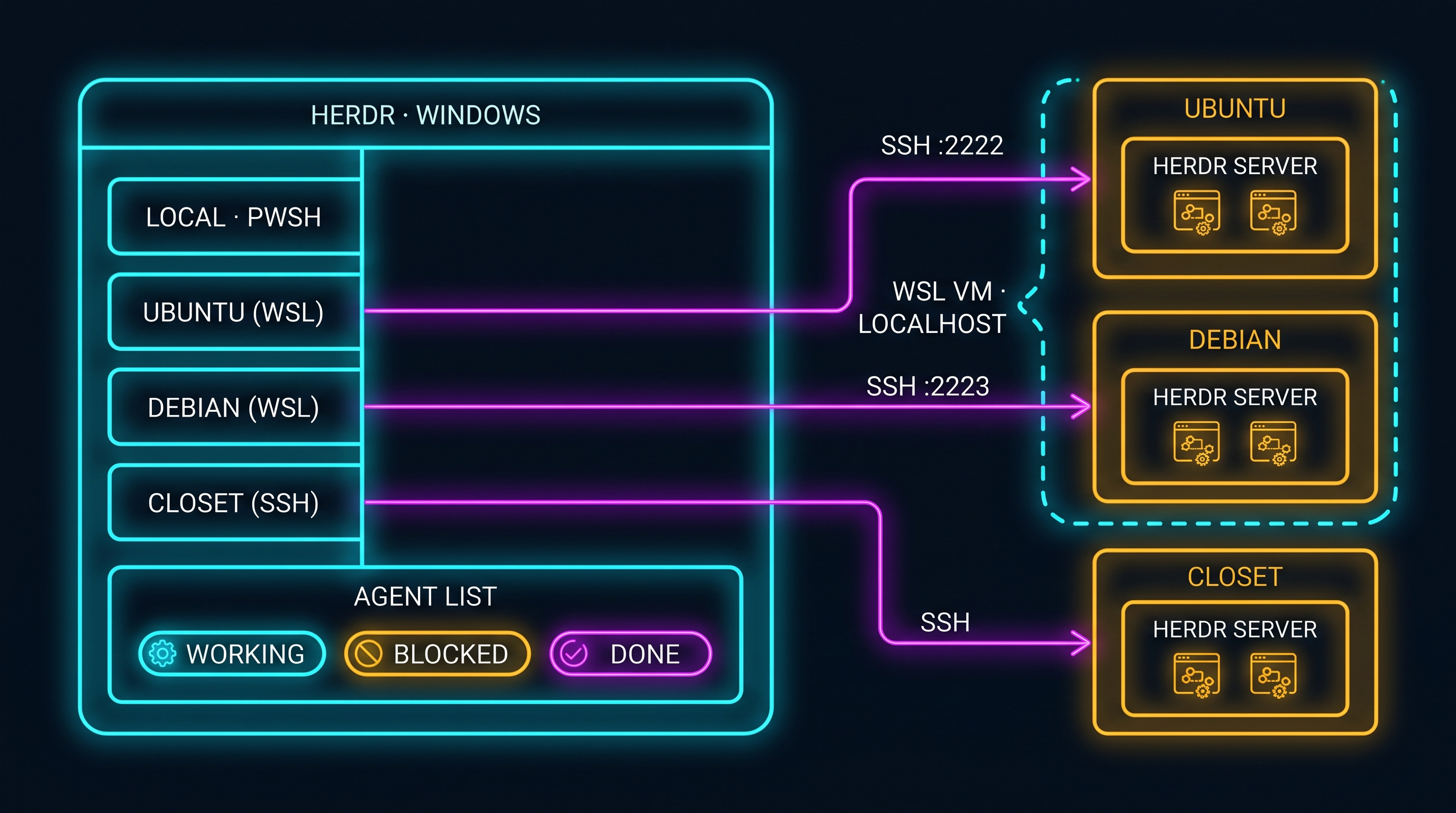
The better move is to stop thinking of WSL as a terminal and start treating each distro as a host. Herdr already knows how to work with hosts. Its saved SSH machines (opens in new tab) feature keeps Local and any number of remote machines in one window, each reconnecting on its own, with a single combined agent list across all of them. Herdr does not store passwords or keys. It leans on whatever SSH setup you already have.
So I give each distro an SSH server and a Herdr server of its own. With WSL’s mirrored networking mode (opens in new tab), Windows and WSL reach each other on localhost, so there is no IP address to chase. My distros run in the same lightweight VM, so each SSH server gets its own port:
# %USERPROFILE%\.wslconfig
[wsl2]
networkingMode=mirrored

# %USERPROFILE%\.ssh\config
Host wsl-ubuntu
    HostName localhost
    Port 2222
Host wsl-debian
    HostName localhost
    Port 2223
Host closet
    HostName closet.lan
Inside each distro, systemd brings up sshd on its port. On the Windows side, there are three commands:
herdr machine add wsl-ubuntu --label "Ubuntu"
herdr machine add wsl-debian --label "Debian (clean)"
herdr machine add closet --label "Closet"
machine add checks the remote side and offers to install or update Herdr there if it needs to, asking first. Then it starts the remote server and saves the profile.
The result is a little uncanny. My Ubuntu distro, running a few centimeters from the Windows kernel, shows up in the sidebar exactly like the box in the closet. Agents inside it are watched by a Linux Herdr server running next to them, so their state is read where the processes live. And when I close the window to reboot Windows Terminal, the Linux side never notices.
Remote Boxes, Same Sidebar
Once a distro is just another host, a real remote host stops being special. The closet box and the cloud VM join the same way, through an SSH target and a label. Herdr turns on SSH compression to cut screen-update traffic, adds fallback keepalives that your own SSH config can override, and retries dropped machines in the background.
The same routing works from scripts. Prefix any API command with --machine, and it goes to that host’s server over plain, non-interactive SSH:
herdr --machine "Closet" worktree create --cwd ~/code/blog --branch reviewThis matters more than it looks. Agents increasingly drive their own tooling, and an agent that can say “open a worktree on the build box and start a pane there” without anyone opening a session is an agent that has stopped commuting too. I wrote about why that boundary matters in Agents Don’t Commute. Here the boundary is SSH, with every request flowing over a channel you already understand.
The Agent List Is the Real UI
After a few weeks I noticed that I barely look at the panes anymore. I look at the agent list.
It answers the expensive question directly. Ubuntu: working. Closet: done. Debian: blocked, waiting on me for a decision about a migration. One glance, across four machines and two operating systems, and I know where my attention is owed. Everything else is a place I visit when that list sends me there.
That is the shift I care about. A multiplexer organizes terminals. What I needed was something that organizes my attention, and with agents doing real work in parallel, attention is the scarce resource. Herdr’s newer pieces lean the same way. There is now a desktop app (opens in new tab) with Windows builds, sitting on a separate runtime called herdr-core, and a phone app that connects to your machines over SSH so you can see who needs you from the couch. I have only kicked the tires on the app. The terminal version is what I trust today.
What the Institution Sees
Every time I fall for a developer tool, the architect in me asks the other question. Picture the same pattern on a fleet of corporate laptops. Both sides of that picture are legitimate.
The developer side is real. One window over every environment removes friction that nobody meters: context switches, lost sessions, and the twenty minutes an agent sat blocked because its terminal was buried. Agents finish more work when a person sees, quickly, that they are stuck. This is the same flow argument as the paved road for WSL. It is about the experience of the person doing the work, and it is a genuine good.
The control side is just as real. An institution needs to know which identity ran which process on which host, where data goes when an agent sends something out, and whether any of this survives an audit. A tool that quietly stretches tunnels across hosts and caches credentials would deserve a hard no.
What I find interesting is how much of Herdr’s design lands on the right side of that line by default. SSH is the only transport between machines, and Herdr stores no credentials of its own, so your existing key management, host-key checking, and session policy still apply unchanged. An unknown host key stays a warning. Agent state is read on the server where the process runs, not on a laptop that might be asleep. Every cross-machine command is an explicit, named request to an explicit, named machine.
That is how the two sides reconcile. The control plane is the reason you can say yes to the experience. If the transport is something your security team already governs, the conversation moves from “should developers have this” to “which hosts may it reach, and under which identities,” and that is a conversation an architect can actually finish.
What I Cannot Promise You
Some of this is rough, and you should know where.
The WSL pattern is mine, not Herdr’s. It works on my machine, and I have not seen it in the docs or tested it at scale. WSL also shuts its VM down when it decides nothing is running. Look at the wsl-config (opens in new tab) idle settings before you trust a long-running agent to it.
Windows is also a second-class SSH client today. Herdr’s own docs note that Windows OpenSSH does not reuse connections the way Linux and macOS clients do, and that recovering SSH authentication from a local Windows client is not supported yet. When a connection drops for an auth reason, I fix it by hand.
And the tool is young and moving fast. The desktop app is labeled beta. Some numbers you will find in reviews, star counts and licenses among them, are out of date within a few weeks. Pin your versions and read the release notes.
Where This Lands
This post was written in its own Git worktree, by the way, apart from the main branch until it was ready. Herdr treats worktrees as first-class: it creates them from the sidebar and groups each one under the workspace it came from, so a draft and the agent working on it sit in one indented cluster instead of another stray tab.
That is the whole idea in miniature. Windows stays Windows. Every Linux, near or far, becomes a machine. And one list tells me where I am needed. The next step I want to try is letting an agent on one machine ask for help from an agent on another, with SSH as the only bridge between them. When I get that working, I will write it up.
Prefer to watch? The video version is on YouTube (opens in new tab).
If this resonated, read WSL Is Not Optional for why Linux belongs on the laptop in the first place, and Agents Don’t Commute for what has to fence the agents once it gets there.
Find me on X @orestesgarcia (opens in new tab) or LinkedIn (opens in new tab).
Get the next field note.
Regulated AI, architecture and platform economics — in your inbox as they publish.