Dead Air Is the Bug: Designing a Voice for My AI Assistant
Giving an AI assistant a phone number looks like a model-selection problem. It isn't. A conversation is a real-time protocol with a one-second budget, turn-taking rules and an interrupt line, and the design choices that matter are about time, failure and where the audio goes, not which model is smartest.
Contents
On a phone call, silence is the loudest failure there is.
A wrong answer gets a “no, that’s not what I meant.” Three seconds of nothing gets a hang-up. People forgive a voice that misunderstands them far faster than a voice that leaves them wondering whether anyone is there.
I wanted to call my assistant
My AI assistant lives in text. It reads my notes, runs my workflows, keeps track of what I’m trying to do with my life and my work. It is useful, and it is always behind a keyboard. What I want is simple to describe: a phone number. I call it from the car, it answers, we talk, it does the thing.
I assumed the job was picking the best voice. Find the most natural text-to-speech model, the most accurate transcription model, plug in a language model, done. So the first thing I tried was an impressive local voice studio, the kind of desktop app that clones a voice from a few seconds of audio and sounds close to the paid services.
It failed in a way that taught me more than a success would have. To clone a voice, the studio needs a transcript of the reference clip. When you don’t give it one, it quietly runs a speech-recognition model on the clip first. I didn’t have that model installed, so synthesis stopped halfway through. On a desk, that’s an error message. On a live call, that’s dead air.
That was the moment the project changed shape for me. A voice studio is a tool for making audio. A phone assistant is a switchboard. They have different jobs, and the second one is mostly about time.
There are two more constraints that make this personal. I’m Cuban, and the people most likely to call my assistant switch between English and Spanish mid-sentence, so both languages are table stakes. And phone audio is terrible. The trunk delivers 8 kHz narrowband audio, the same G.711 codec phones have used for decades. Every benchmark I read was recorded at twice that quality or better.
Everything below is design, not a field report. Nothing answers my number yet. But working through the architecture surfaced five principles I think apply to anyone putting a voice on an agent, and a few that apply well beyond voice.
Principle 1: Latency is a budget, not a metric
Humans are fast at taking turns. A large cross-language study of conversation found that the typical gap between one speaker finishing and the next one starting sits around 200 milliseconds (opens in new tab), with remarkably little variation across ten languages. We start planning our reply before the other person is done.
A voice agent can’t match that yet, so I set a target I think is honest: one second from the moment the caller stops talking to the first syllable of the reply. Then I did what I’d do with any distributed system. I stopped treating latency as a number to measure at the end and started treating it as a budget to allocate up front.
The one-second budget breaks down roughly like this:
- Telephony and network, both ways: 60 to 120 ms
- Deciding the caller is actually done: 200 to 300 ms
- Finalizing the transcript: 50 to 150 ms
- Language model, time to first sentence: 250 to 450 ms
- Text-to-speech, time to first audio: 50 to 150 ms
- Resampling and first packet back to the phone system: 20 to 40 ms
Add up the high ends and you’re over. That’s the point of writing it down. A budget tells you which stage has no slack, and it tells you what kind of quality you’re optimizing for. In a batch workload you want the best transcript. In a conversation you want the first useful result, as early as possible.
That changes almost every choice. Stream everything. Start speaking the first sentence while the model is still writing the second. Keep the system prompt short. Pre-record the greeting. When a tool call will take a while, say “sure, one moment” from a file instead of going quiet. None of these tricks are about model quality, and together they matter more than the model.
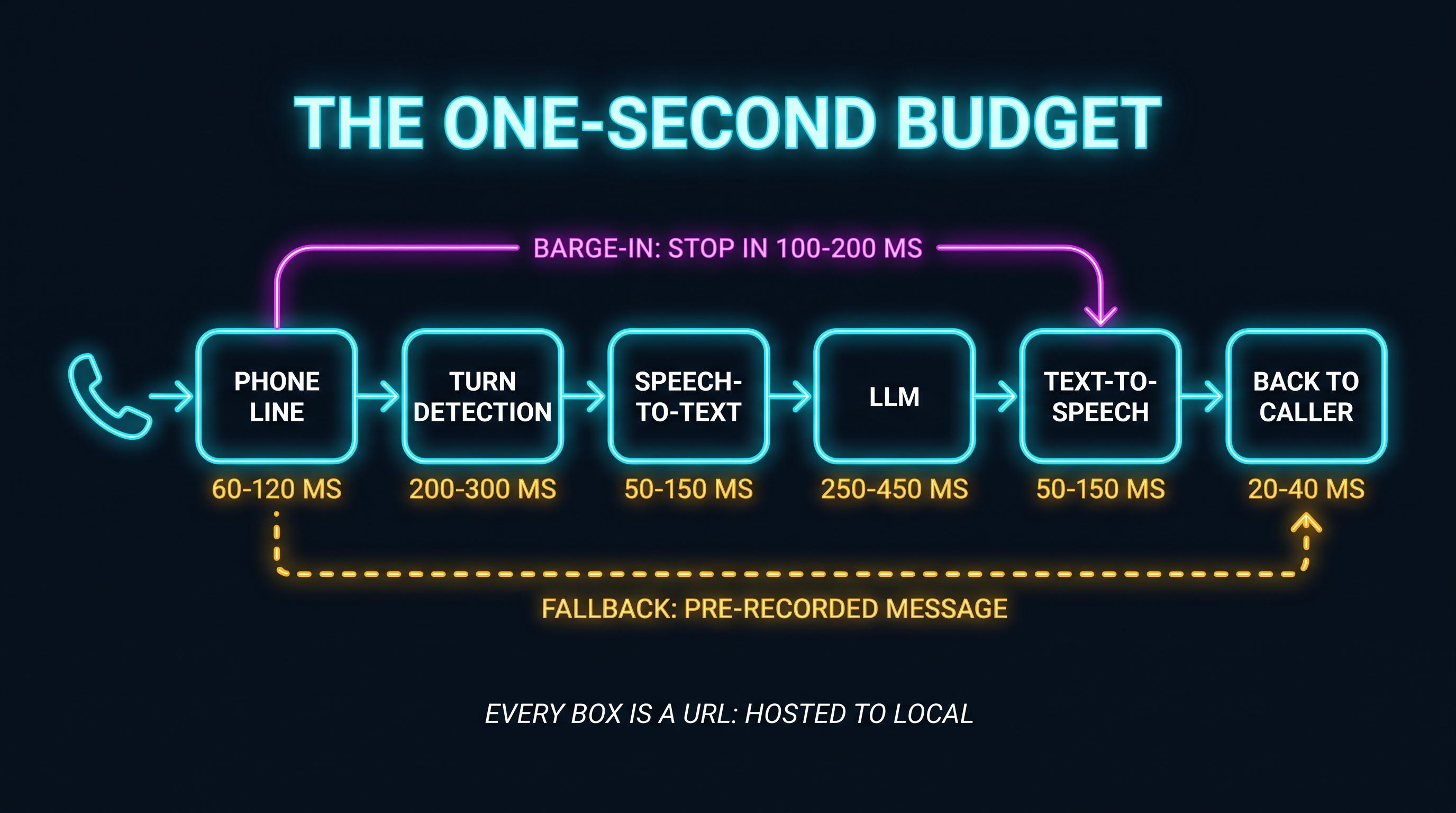
Anyone who has run services in an enterprise will recognize the pattern. You don’t set one SLO for a request that crosses six systems and hope. You give each hop its share and alert on the one that overspends.
Principle 2: Turn-taking is the real model
Here’s the part I underestimated. The hardest question in a voice conversation is “is it my turn?”
The naive answer is silence. Wait for the caller to stop talking for, say, 800 milliseconds, then reply. That fails in both directions. People pause mid-thought (“I need to move my appointment to… Thursday”), and a fixed timeout either cuts them off or makes every reply feel sluggish.
So the design uses two layers. A small voice-activity detector, Silero VAD (opens in new tab), decides whether there is speech at all. On top of that, a semantic end-of-turn model, Pipecat’s Smart Turn v3 (opens in new tab), looks at the audio and judges whether the sentence sounds finished. It’s BSD-licensed, covers 23 languages, and the project reports inference around 65 ms on a standard cloud instance. Cheap enough to run on every pause.
The other half of turn-taking is the interrupt. Callers talk over the agent. They always will, especially when the agent is reading back something they already know. When that happens, playback has to stop within 100 to 200 milliseconds, the pending speech and the in-flight model response have to be cancelled, and the transcriber has to already be listening.
That’s when I stopped thinking of this as “speech-to-text plus a chatbot plus text-to-speech.” A conversation is a protocol. It has turn semantics, an interrupt line, and acknowledgements. The models are payloads moving through it. Get the protocol wrong and the smartest model in the world still sounds like a bad automated phone tree.
Pipecat (opens in new tab) is the orchestrator I’d build on precisely because it treats interruption handling, voice detection and turn detection as first-class pieces of the pipeline rather than features you bolt on later.
Principle 3: Benchmarks are recorded in a studio; your callers are in a car
Speech models are trained and scored on clean, wideband audio. My callers will be on a highway, through a cell network, through a SIP trunk, at 8 kHz. Upsampling that audio to the 16 kHz a model expects doesn’t bring the missing frequencies back. It just gives the model a bigger, emptier file.
So I expect real-world accuracy to be worse than any leaderboard says, and I’ve stopped trusting leaderboards for this decision. The evaluation plan is boring on purpose: record a few dozen real test calls through my own trunk, in English and Spanish, quiet and noisy, and measure word error rate on those.
The model choice still matters, just for a different reason than accuracy. For transcription I picked NVIDIA’s Nemotron 3.5 ASR Streaming (opens in new tab), served locally through NeMo-Speech.cpp (opens in new tab). It streams natively in configurable chunks from 80 ms up to about a second, it covers US English and US Spanish, it punctuates, and its words are final when they’re decoded.
That last property is the one I care about. Many streaming setups emit partial transcripts and then revise them as more audio arrives. Revisions are fine for captions. For an agent that wants to start thinking before the caller finishes, a word that might change is a word you can’t act on. Softcery’s write-up on self-hosting streaming STT (opens in new tab) makes the same trade explicit: top offline accuracy and good live behavior are different properties, and you have to pick for the one you’re running.
Principle 4: Separate build-time from run-time
The voice studio didn’t stop being useful when it failed. It moved.
Some audio has to be generated live, because it depends on what the caller just said. A lot of audio doesn’t. The greeting. The “one moment while I check.” The after-hours message. The “I’m having trouble right now, leave me a message.” Those can be designed, cloned, polished and listened to a dozen times offline, then saved as WAV files the phone system plays with zero runtime cost and zero runtime risk.
So the studio becomes a workshop. It’s where I’d design the assistant’s voice and produce every fixed prompt. It never sits in the call path. The live path gets something small, fast and boring: Kokoro-82M (opens in new tab), an 82-million-parameter Apache-2.0 model served through Kokoro-FastAPI (opens in new tab), which streams raw audio, runs fast on a GPU and survives on a CPU, and ships English and Spanish voices.
The general rule is one I’ve seen hold in every system I’ve worked on. Anything that doesn’t need to be computed at request time shouldn’t be. Precompute it, test it, ship it as an artifact. The hot path should contain only what has to be decided now.
Principle 5: Licenses are architecture
The voice-cloning model that made the studio so impressive has open code. Its pre-trained weights are a different story. The model card (opens in new tab) lists them as CC-BY-NC “due to constraints from its training data.” Non-commercial.
For a personal assistant that only calls me, that’s fine. The moment the same voice answers for anything that resembles a business, it isn’t. And voices have a way of becoming the brand. Once people recognize how your assistant sounds, swapping it out is a product decision rather than a config change.
So I treat the license column as a design constraint, sitting next to latency and language support, and I check it before a voice gets anywhere near production. Kokoro is Apache-2.0. Smart Turn is BSD. Nemotron’s license permits commercial use. That isn’t legal advice; it’s an architect noticing that “am I allowed to use this?” is cheaper to answer at design time than after launch.
Every hop is a URL
Here’s the decision that makes the rest of the plan survivable. Transcription, speech and the language model each sit behind an OpenAI-style HTTP endpoint. The orchestrator doesn’t know or care whether the thing on the other side is a container on my own GPU or a hosted API.
That turns the hardware question into a configuration question. I wrote about this pattern in The Exit Clause Your Architecture Is Missing: the boundary you draw on day one is what decides whether leaving is a project or a setting. Here it’s literal. Moving from hosted to local is swapping three base URLs and one client class. It’s the same reason I care more about the layer under a framework than the framework itself, which I argued in Pick the Engine, Then the Framework.
Rent first, buy the slowest hop
I don’t own a GPU for this yet. So the first phase runs everything hosted. OpenRouter added audio endpoints (opens in new tab), and the same models in my local plan are there: Nemotron for transcription, Kokoro for speech (opens in new tab), and any chat model for the brain. The only box I need is a small CPU machine running the orchestrator, the voice detector and the turn model. Speech costs at personal volumes round to pocket change; the language model drives the bill.
Both sides of this deserve a fair hearing.
The case for hosted is real. I get a working assistant now instead of after a hardware purchase. Someone else keeps the models updated. I can prove the hard parts (the phone integration, barge-in, the fallbacks) without a single driver install. For most people building their first voice agent, that’s the correct starting point.
The case for local is just as real. Every call’s audio leaves my house and passes through a router and a model provider. If my internet goes down or the provider has a bad afternoon, my assistant goes silent. And hosted transcription in this setup is per-utterance: the caller finishes, then the whole clip uploads and gets transcribed, so that time stacks on top of everything else instead of overlapping the caller’s speech. I’d plan around 1.2 to 1.8 seconds per turn, not one.
The way I reconcile them is the URL boundary. It lets me say yes to hosted today without giving up the exit. And it tells me what to buy first. The first piece of hardware runs transcription locally, because that’s the one hop that can work while the caller is still talking. Speech and the language model can stay hosted a while longer. Buy for the slowest hop, measure, then decide on the next one.
Design the sound of failure
Every component in this stack will fail at some point. The question is what the caller hears when it does.
My answer: never silence. Every service gets a health check. If transcription, speech or the model is down, the phone system skips the agent entirely and plays a pre-recorded message, the kind made offline in the workshop, then takes a voicemail or forwards the call. A degraded experience with a human-sounding apology beats a perfect architecture that sometimes breathes into the phone and says nothing.
One more piece belongs here, because it’s the kind of failure that doesn’t page anyone. Transcribing a call can legally count as recording it, and several US states require every party to consent. So the first thing the assistant says, on every call, is that it’s an automated assistant and the call may be transcribed. And transcripts get deleted by default unless there’s a reason to keep them.
What I don’t know yet
Nothing in this post has answered a real call. Every number above is a budget, not a measurement, and the one-second target may not survive contact with a home internet connection and a cheap phone line. I’ll find out when I build the first phase.
The field also moves monthly. Several of the pieces I picked in October are only months old, and their serving tools have small communities. I’ll pin versions and keep fallbacks, and I fully expect to rewrite part of this stack within a year.
And there’s a question I can’t answer with an architecture diagram. I’m not sure a voice makes my assistant better. It may just make it more present. Text gives me time to think; a phone call gives me immediacy. I suspect I’ll use both for different things, but that’s a guess.
Build the protocol first
If you’re putting a voice on your own agent, here’s the short version. Pick the protocol before you pick the models. Write down your latency budget and give every stage its slice. Treat end-of-turn detection and barge-in as core features. Test on the audio your callers actually have. Keep the studio out of the hot path. Read the license. Put every model behind a URL. And decide what the caller hears when something breaks, because something will.
The models will keep getting better on their own. Silence is the bug you have to design out yourself.
Next, I’ll build the hosted phase and publish the measured budget, stage by stage, against the one I wrote here.
Prefer to watch? The video version is on YouTube (opens in new tab).
If you’re building an assistant that needs to remember as well as talk, read A Second Brain Needs a Body.
Find me on X @orestesgarcia (opens in new tab) or LinkedIn (opens in new tab).
Get the next field note.
Regulated AI, architecture and platform economics — in your inbox as they publish.