The Chat Box Is the Cheap Part
A build guide for self-hosting an enterprise AI chat front-end when a Teams bot can't promise US data residency. Entra at the perimeter with zero app auth code, Azure OpenAI pinned to a US region, and the config to ship it.
Contents
You are comparing Open WebUI, LibreChat, and whatever got dropped in the thread this week, trying to pick the chat window your people will type into. It is the wrong thing to spend a week on. The chat window is a stateless container you can swap in an afternoon. The two things that are expensive to get wrong sit underneath it: where the bytes get processed, and who is allowed through the door.
Decide those two first, with real config, and the UI becomes a preference. Here is the build.
The Teams bot can’t promise US-only processing
The default move is a Teams bot or a Copilot surface, because that is where people already are. If your data can legally go anywhere, take it. If you have to guarantee US-only handling, read Microsoft’s own words first.
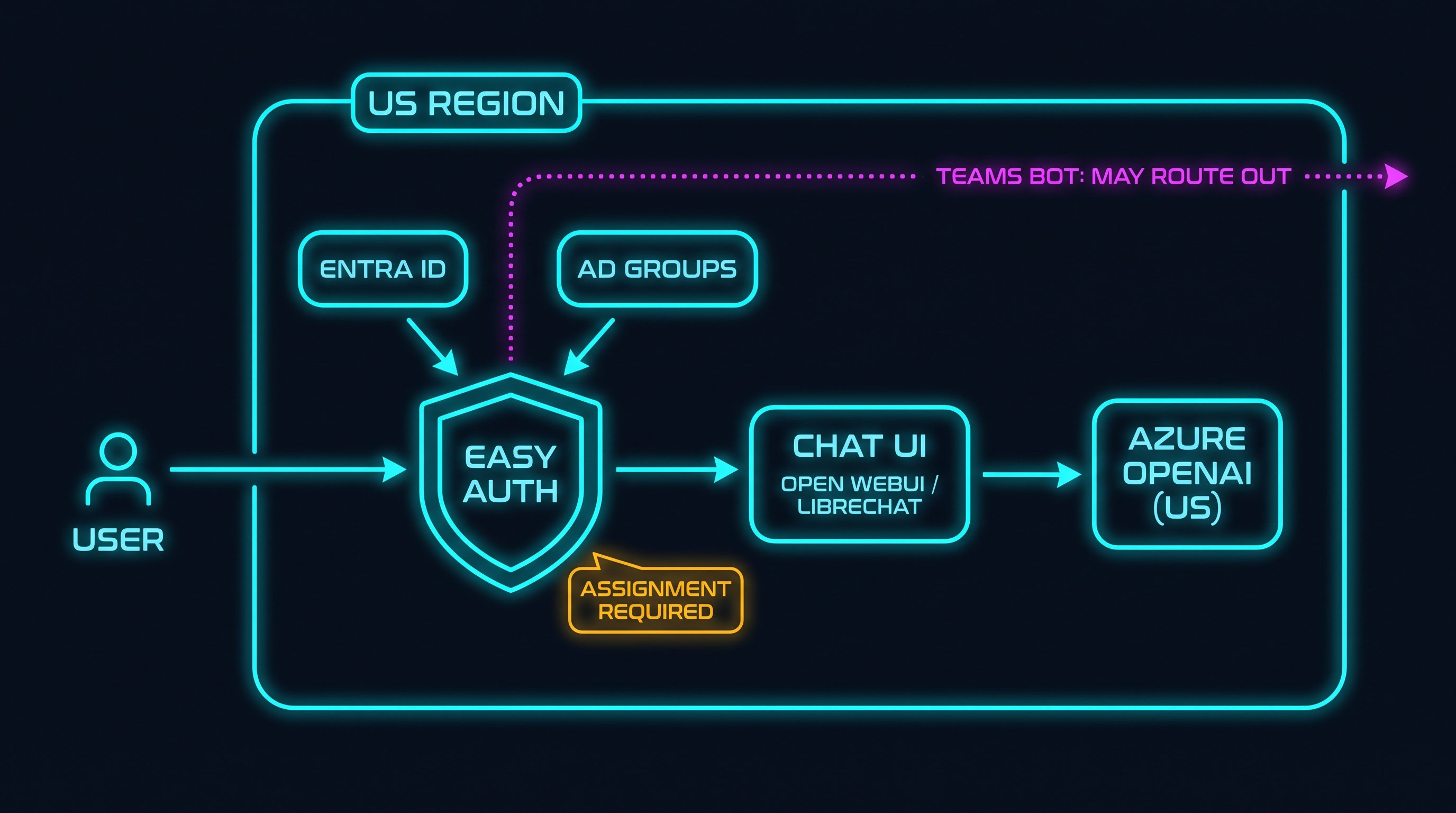
Microsoft added Copilot to its data-residency commitments on March 1, 2024, and the at-rest storage commitments for eligible geographies are real. The gap is processing, not storage. From Microsoft’s own Copilot privacy documentation: calls to the model “are routed to the closest data centers in the region, but also can call into other regions where capacity is available during high utilization periods,” and for anyone outside the EU, “customers outside the EU may have their queries processed in the US, EU, or other regions.”
There is a formal processing boundary, the EU Data Boundary, and it is for the EU. There is no US-named equivalent, and even the EU one excludes Anthropic as a subprocessor. So the defensible claim, the one that survives a risk committee, is narrow and correct: Microsoft does not unconditionally guarantee US-only processing for bot and Copilot traffic. That is enough to disqualify the easy surface when “guarantee” is a hard requirement.
Two decisions under the UI
Strip the chat window away and two choices remain, neither of which is a chat window.
- Where inference runs. Pin it to Azure OpenAI in a US region, or a US Data Zone for in-boundary load balancing. Processing location stops being a hope and becomes a deployment parameter. Azure OpenAI does not train on your prompts or completions, and the abuse-monitoring human review can be turned off.
- Who can reach it. The perimeter is not a login screen inside the app. It is a property of how you host the app, enforced before a request reaches your container. Most teams bolt this on last, inside the UI, which is backwards.
The chat window renders conversations. It sits downstream of both decisions.
Gate it with Entra, with zero auth code in the app
Both Azure Container Apps and Azure App Service ship built-in authentication (“Easy Auth”): a sidecar that intercepts HTTP before your container, so unauthenticated traffic never reaches the app and the identity arrives as the X-MS-CLIENT-PRINCIPAL header. Your app implements no OAuth. Turn it on and require auth:
# register Entra as the identity provider
az containerapp auth microsoft update -g $RG --name chat \
  --client-id $APP_ID --client-secret $APP_SECRET \
  --issuer "https://login.microsoftonline.com/$TENANT_ID/v2.0" --yes

# reject anything unauthenticated before it hits the container
az containerapp auth update -g $RG --name chat \
  --unauthenticated-client-action Return401
--unauthenticated-client-action also takes RedirectToLoginPage if you want browser users bounced to a login instead of a 401. That is authentication. The part that turns it into access control by AD group happens in Entra, not in the app: mark the enterprise application as assignment-required and assign the security groups.
APP_OBJ=$(az ad sp show --id $APP_ID --query id -o tsv)
# require explicit assignment: no assignment, no token
az rest --method PATCH \
  --uri "https://graph.microsoft.com/v1.0/servicePrincipals/$APP_OBJ" \
  --body '{"appRoleAssignmentRequired": true}'
# then assign the groups (Entra portal: Enterprise App > Users and groups > Add,
# or Graph: POST /servicePrincipals/$APP_OBJ/appRoleAssignedTo)
Now Entra only issues a token to a member of an assigned group; everyone else is rejected before they touch your infrastructure. You get enterprise SSO and group-based access control, enforced at the edge, with no auth code in the thing you are hosting. The access list is your existing AD groups, and membership changes take effect on the next token. That is also what makes the UI swappable: a front-end with no auth of its own is safe behind this gate, because nothing unauthenticated reaches it. The same instinct runs through owning the harness: durable control lives in the layer you run.
The chat UI, which barely matters now
With the door handled, pick on license and features, not on how good the login page is.
LibreChat is where I would start: MIT licensed, no seat-count surprises, native Entra OIDC, deep per-group RBAC, agents and MCP built in, and it talks to Azure OpenAI with a managed identity so you can ban long-lived keys. Minimal Entra wiring:
# .env
DOMAIN_CLIENT=https://chat.example.com
DOMAIN_SERVER=https://chat.example.com
ALLOW_SOCIAL_LOGIN=true

OPENID_ISSUER=https://login.microsoftonline.com/${TENANT_ID}/v2.0/
OPENID_CLIENT_ID=${APP_ID}
OPENID_CLIENT_SECRET=${APP_SECRET}
OPENID_SESSION_SECRET=${RANDOM_STRING}
OPENID_SCOPE=openid profile email
OPENID_CALLBACK_URL=/oauth/openid/callback

# gate login on an Entra app role / group (defense in depth behind Easy Auth)
OPENID_REQUIRED_ROLE=chat-users
OPENID_REQUIRED_ROLE_PARAMETER_PATH=roles
OPENID_REQUIRED_ROLE_TOKEN_KIND=id

# talk to Azure OpenAI with a managed identity, no API key
AZURE_OPENAI_USE_ENTRA_ID=true
Open WebUI is the close second and wins on feel: the slickest single-container UX, and real Entra group sync that strictly reconciles membership on every login.
# .env
MICROSOFT_CLIENT_ID=${APP_ID}
MICROSOFT_CLIENT_SECRET=${APP_SECRET}
MICROSOFT_CLIENT_TENANT_ID=${TENANT_ID}
MICROSOFT_OAUTH_SCOPE=openid email profile offline_access   # offline_access or sessions die in ~1h
ENABLE_OAUTH_SIGNUP=true
ENABLE_OAUTH_GROUP_MANAGEMENT=true                          # strict sync: claims are the source of truth
OAUTH_GROUP_CLAIM=groups
Two Open WebUI gotchas to find in planning, not week three. Its license changed in 2025 to a custom one with a branding clause past roughly fifty users, so a company-wide rollout is a license decision. And Entra emits group GUIDs, not names, by default; to get readable groups you edit the app manifest and keep groupMembershipClaims to ApplicationGroup only (any SecurityGroup/All value forces GUIDs), and assign the groups to the enterprise app:
"groupMembershipClaims": "ApplicationGroup",
"optionalClaims": {
  "idToken": [
    { "name": "groups", "source": null, "essential": false,
      "additionalProperties": ["cloud_displayname"] }
  ]
}
The rest of the field (AnythingLLM, Lobe Chat, Big-AGI, Chainlit, Jan) is weaker on native Entra-group RBAC, but it does not matter much: behind the Easy Auth gate, any of them is safe, because only assigned people get in. You lose fine-grained in-app permissions, not the perimeter guarantee. Host on Container Apps or App Service, not AKS; you want the sidecar auth and a managed runtime, not a cluster to babysit.
The two links someone will send you
Buzz (buzz.xyz, Block’s Nostr-based group chat for people and agents, Apache 2.0) gives every participant a self-sovereign cryptographic keypair. That is the opposite of this requirement. You want access gated by a central authority you already run, revocable by your identity team and readable by an auditor. A keypair is not a security group. Compelling model, wrong job here; I covered it in the piece on agent signatures.
Paperclip (github.com/paperclipai/paperclip) is open source, self-hostable, and has a coordination layer, which is exactly why it looks relevant and isn’t. It is a control plane for a fleet of agents (org chart, roles, budgets, governance), not the window a person types into. Choosing your chat surface and choosing your agent control plane are two decisions at two layers; see From Paperclip to Production. It belongs below the chat box, not instead of it.
The tradeoff, straight
- Cost of the self-hosted path: you own a container. You patch it, track a fast-moving upstream, and run the gateway, logs, and backups. “Low maintenance” is true against AKS and false against a Teams bot you did not have to build.
- What you buy: a processing path pinned to a US region, access you can attest to by group membership, and logs in your own subscription.
- When to skip it: no hard residency requirement. Then the Teams bot is the right call and this is over-engineering.
- The reconciliation: the Easy Auth gate plus the pinned region is not a tax on the experience. It is what lets you say yes to a good experience without lying about where the data went. Governance that attaches to a runtime you own beats governance that only travels with a vendor SDK, the same argument as governance or containment and who issued the agent.
What I’d ship
- Azure OpenAI in a US region (or US Data Zone), accessed by managed identity.
- The chat UI (LibreChat) as one container on Azure Container Apps.
- Easy Auth on,
--unauthenticated-client-action Return401, Entra provider registered. - Enterprise app set to assignment-required, gated by the AD security groups your identity team already manages.
- LibreChat pointed at the Azure OpenAI endpoint with
AZURE_OPENAI_USE_ENTRA_ID=true.
That is a US-pinned, Entra-gated agent front-end with no custom auth code and one container to operate. The chat box was always the cheap part. The hard decision was proving where the words went after someone hit enter.
The companion read is You’re Renting the Model. Own the Harness., the same instinct pointed at the front door.
I write about AI-assisted development, enterprise architecture, and building in regulated environments. If you are standing up an agent front-end under real residency pressure, find me on X @orestesgarcia or LinkedIn /in/setsero.
Get the next field note.
Regulated AI, architecture and platform economics — in your inbox as they publish.