Who Issued the Agent?
The last post in this series ended with a question. Microsoft’s Agent 365 gives every agent in your fleet a Microsoft Entra Agent ID, a durable Microsoft credential, governed through Entra, regardless of where the agent was built. The strategic question I left open was: who issued the identity?
Here is the answer. Microsoft did. And if you are running Okta Workforce as your enterprise IdP, federated to Entra for M365, that answer has consequences that have not been written about clearly yet.
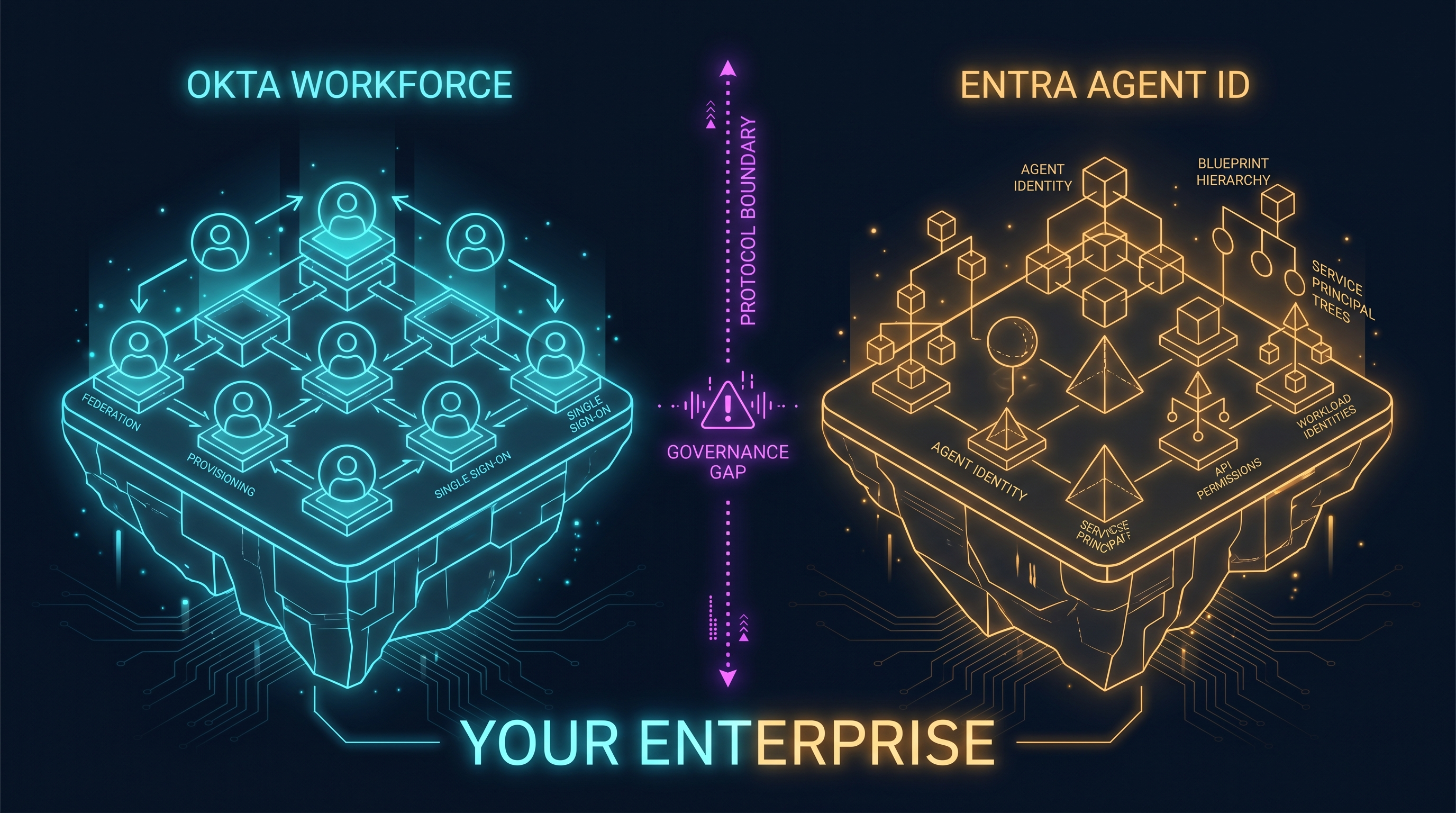
Your Okta federation is real, functional, and well-understood. It governs your workforce identities. What it does not govern, what it structurally cannot govern, is your agent identities. When a Copilot Studio agent gets an Entra Agent ID, Okta does not learn about it, cannot certify access against it, and has no lifecycle hook into it. The governance gap is not an integration backlog item. It is a protocol boundary.
And if you have been deploying agents through Teams, you may have already crossed it.
What Entra Agent ID Actually Is
It helps to be precise about what was built here, because the marketing framing does not survive contact with the documentation.
Entra Agent ID is not a new directory object type. It is a specialized service principal subtype: a service principal with an agent classification layered on existing Entra infrastructure. Understanding that distinction matters for what follows.
The architecture has four constructs:
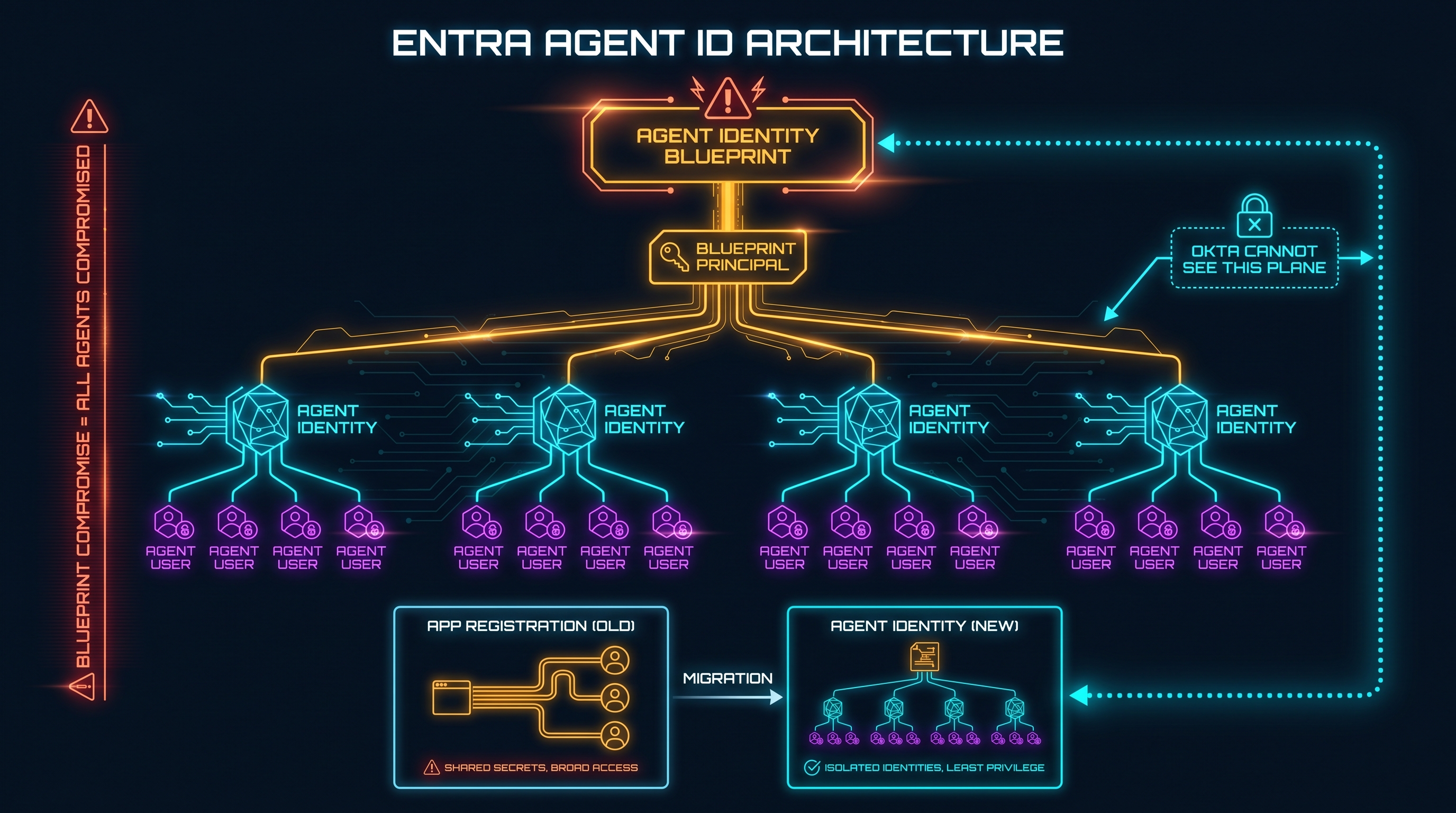
Agent identity blueprint, the logical template that defines an agent type. The blueprint is the real security boundary. Microsoft’s documentation states this explicitly: a compromise of the blueprint’s credentials affects all agent identities under it. Blueprint sprawl is the new app-registration sprawl.
Agent identity blueprint principal, the service principal representing the blueprint inside your tenant. It can only create agent identities and agent users. It cannot access resources.
Agent identity, the service principal with the agent subtype representing a specific running instance of the blueprint. This is what holds permissions and acquires tokens against resources.
Agent user, an optional non-human user account paired to an agent identity. Used when the agent needs a Teams presence, a mailbox, or the ability to act as a named persona in M365.
The token model is standard OAuth2. There is no new token type. New optional claims have been added (xms_act_fct for actor facets, xms_par_app_azp for the parent blueprint), but the underlying structure is the same Entra JWT your existing tooling already processes.
What is not standard is the flow model. Agent identities support exactly three flow shapes: autonomous app flow (client credentials), agent-on-behalf-of flow (OBO with a user’s JWT), and agent’s user account flow. All three are programmatic. All three are confidential client. There are no redirect URIs. No public clients. No browser flows. Agents do not log in.
This is not a new protocol. It is a new governance category label on existing Entra primitives, applied specifically to agents. The significance is not technical novelty. It is the creation of a category that gives Microsoft and Entra admins a first-class way to track, govern, and ultimately control agent proliferation. The category itself is the product.
One architectural constraint worth naming explicitly. Conditional Access for agents supports grant controls of exactly one type: block. You cannot require MFA. You cannot require a compliant device. An agent does not have hands. Your entire CA enforcement posture for agents reduces to a binary: allow or kill. That is a hard architectural constraint, not a preview limitation.
Agent 365 and the Automatic Enrollment Problem
Agent 365 went GA today, May 1, 2026. The $15/user/month is per human user, not per agent. Microsoft’s framing: “agents acting on behalf of a licensed user are covered by the user’s license.” It is a governance control plane (a registry, a visualization layer, conditional access, and a fleet inventory), not a compute purchase.
The enrollment question is where this gets operationally significant.
When Entra Agent Identity is enabled at the Power Platform environment level (a setting controlled by Power Platform administrators, not Okta administrators, not your identity team leads), Copilot Studio automatically creates an Entra agent identity for every new agent. The first agent created in an environment also creates a tenant-wide blueprint: the “Microsoft Copilot Studio agent identity blueprint,” with a fixed Blueprint ID. Every subsequent agent in that environment becomes a child of that blueprint.
A Microsoft-owned blueprint principal manages these identities via Federated Identity Credentials. No one in your tenant, including your Global Administrator, can mint tokens for the agent identity directly. The agent owner is added as a sponsor with limited permissions.
The auto-created identity is scope-empty by default. No Graph permissions. No resource access. The agent cannot read your SharePoint or send email until a maker explicitly adds permissions and an Entra admin grants tenant-wide consent. That is the design intention, and it is correct.
But the identity is Entra-anchored regardless of permissions. Whether or not the agent can read anything, it exists in Entra. It has an object ID. It appears in sign-in logs as a service principal. And Microsoft has stated that opt-out of this behavior is “temporary”: Entra Agent Identity will become mandatory for all new Copilot Studio agents.
Here is what that looks like from inside a federated enterprise. Your IT team deploys three Copilot Studio agents to Teams: a procurement assistant, an HR onboarding agent, a customer-data lookup agent. The Power Platform admin enables Entra Agent Identity for the environment. Each agent gets an Entra Agent ID. The identity team was not in the room. Okta does not know these agents exist.
Teams as the Channel That Carries the Identity
Teams is not a neutral channel. It has an identity model built into it, and understanding that model explains why the federation gap is structural rather than incidental.
When a bot or agent is registered through Azure Bot Service (the current mechanism, with Microsoft 365 Agents SDK as its successor), it authenticates to the Bot Connector using client credentials. The Bot Service posts an Activity to the agent’s endpoint, and that Activity carries specific identity information about the user who sent the message.
The from.aadObjectId field in the incoming Activity is the Entra Object ID of that user. Not their Okta user ID. Not the federated identity. The Entra OID, specifically the OID of the Entra user object that Entra maintains for that person in your tenant.
This is where the federation boundary becomes visible.
When you have Okta as your primary IdP federated to Entra for M365, the authentication flow for a human signing into Teams looks like this: Okta authenticates the user, issues a SAML assertion to Entra, and Entra uses that assertion to populate or match the user’s Entra user object. From that point on, Entra issues its own tokens. Microsoft’s documentation states this explicitly: Entra ID does not forward SAML assertions from the external IdP to the application. It extracts claims from the Entra user profile.
By the time the Teams Activity reaches your agent, the from.aadObjectId is an Entra-issued identity. If Okta passed custom claims (group memberships, department attributes, custom entitlements), those are available to the agent only if they were mapped into Entra user profile attributes during federation setup, and only via a separate Microsoft Graph call. The Okta-sourced claims are not in the Activity payload. The agent sees the Entra identity.
The agent side of that exchange carries no Okta provenance at all. The bot’s identity is its Microsoft App ID or its Entra Agent ID, both registered in Entra. Teams enforces Entra identity on the agent side of every conversation, regardless of what the human IdP is.
The Federation Architecture You Actually Have
Most large enterprises running Okta plus M365 are in a specific configuration, and it is worth being precise about what that configuration actually covers.
What Okta governs in this setup:
User authentication: the actual MFA challenge when a human logs in. Group membership: provisioned to Entra via SCIM. Application assignment: which users can access which apps in the Okta catalog. Joiner/mover/leaver lifecycle: new hires get accounts, leavers get deprovisioned.
What Entra governs, and Okta cannot see:
Entra service principals. App registrations. Managed identities. Workload identities. Entra Agent IDs.
The reason is the protocol. Okta’s SCIM provisioning with Entra is built on RFC 7643, which defines exactly two core resource types: User and Group. There is no standard SCIM resource type for service principals, workload identities, or agent identities. SCIM was designed for human identity lifecycle management. Agent identities are a different object class that the protocol was never extended to reach.
This is not a statement about Okta’s capabilities. It is a statement about the scope of the protocol the Okta-Entra integration uses. When a new Copilot Studio agent is created as an Entra service principal with an agent subtype, it lands in Microsoft Graph at /servicePrincipals. SCIM operates over /Users and /Groups. The SCIM connector never sees it.
The Federation Gap in Four Moves
The gap has a precise structure.
Move 1: The federation was designed for interactive authentication. SAML federation, OIDC authorization code flow: both require a user present at an authentication moment. A redirect happens. A session is established. Okta participates because Okta is the authentication authority for that interactive moment.
Move 2: Agents use programmatic authentication. None of those flows involve Okta. Client credentials, managed identities, workload identity federation (the three mechanisms agents actually use to acquire tokens) are all confidential client flows with no interactive moment. They go directly to Entra’s token endpoint. There is no federation redirect. There is no Okta involvement.
Move 3: The credential lifecycle for Entra Agent IDs lives entirely in Entra. Creating an Entra Agent ID, managing its credentials, rotating its secrets, deprovisioning it: all of this is Entra-native. The RBAC roles that govern this (Agent ID Administrator, Agent ID Developer, Cloud Application Administrator) are Entra roles. Okta’s Access Certifications for Service Accounts covers SaaS application service accounts and Okta service accounts. Entra service principals are not in scope.
Move 4: This is not a bug. It is a scope gap. The Okta-Entra integration was designed to solve a specific problem: human workforce SSO for M365. That problem is solved well. Service principals were outside scope when the integration was designed. Agent identities did not exist. The integration was never updated to cover them, and SCIM cannot cover them. The protocol does not have a lane for this object class.
What Microsoft Is Not Saying
Three things in the Entra Agent ID documentation that are informative by their absence.
First: the words “Okta,” “Ping,” “ForgeRock,” and “OneLogin” do not appear in the Entra Agent ID documentation. Not in the overview. Not in the governance overview. Not in the agent service principals doc. Not in the registry doc. Not in the known issues page. Not in the audit logs doc. Nowhere.
Every governance mechanism in Entra Agent ID (Conditional Access, Identity Protection, Lifecycle Workflows, access packages, the sponsor model) is Entra-native and license-gated to Entra ID P1 or P2. The architecture silently assumes Entra as the exclusive governance plane for agents.
Microsoft’s only page in the entire identity documentation set that names Okta substantively is titled “Migrate Okta federation to Microsoft Entra authentication.” The documented path for an Okta-primary enterprise is exit, not coexistence. If Microsoft had a clear integration path for Okta-governed agent identities, it would be a prominent documentation page, because Okta plus M365 is one of the most common enterprise identity configurations in the Fortune 1000. The absence of that page is the architecture statement.
Second: the publish workflow routes to the wrong team.
When a maker publishes a Copilot Studio agent to Teams with “Show to everyone in my org,” the approval lands in the Microsoft Teams admin center. The approval role is Teams administrator. If the agent needs Graph permissions, an Application Administrator or Cloud Application Administrator must grant tenant-wide consent, an Entra role held by the M365 team.
In a federated enterprise, the people who click “Approve” in the Teams admin center are the M365 collaboration administrators: Exchange Online, Teams, SharePoint. The identity team, the people who manage Okta, run access certifications, handle joiner/mover/leaver, are a structurally different group in most organizations. The consent workflow routes to one group. Agent identity governance is the responsibility of the other. That gap is organizational, not technical, and it is invisible until something goes wrong.
Third: agent audit attribution requires a workaround.
Microsoft’s own preview known issues page states: “Audit logs don’t distinguish Agent IDs from other identities… Operations initiated by agent identities appear as service principals in audit logs.” To determine whether an audit log actor is a human user, a standard service principal, or an Entra Agent ID, you must execute a runtime Graph lookup against the object ID. The audit row does not tell you.
A SIEM fed by Okta’s syslog will not see any of this. A SIEM that ingests the Microsoft Unified Audit Log will see agent activity, attributed to service principals, indistinguishable from other service principals without the Graph enrichment step. Neither is automatic. Neither is a documented standard deployment pattern.
Three Encounters
These are not hypotheticals. They are organizational patterns in enterprises running this configuration right now.
The access certification that passes. IT runs the quarterly Okta access certification. Reviewers see user X, application Y, then approve or revoke. Six months ago, a Power Platform admin deployed three Copilot Studio agents to Teams. Each agent has an Entra Agent ID. Each has been granted access to SharePoint sites and the ability to send email on behalf of users. Those agents do not appear in the Okta certification campaign. Okta’s certification scope is users. Agents are not users. The certification passes. The access persists.
The Entra admin who didn’t tell anyone. A Power Platform environment admin, not on the identity team, enables Entra Agent Identity for a production environment and deploys five agents over the following month. Each agent gets an Entra Agent ID. The identity team’s change management system has no tickets for any of them. There is no Okta-based request workflow for “register an Entra Agent ID,” because the Okta workflow was designed for user accounts and application assignments. The agents exist; Okta doesn’t know.
The leaver problem. A developer who owned two Copilot Studio agent blueprints leaves the company. Okta runs offboarding: account disabled, SCIM removes the user from Entra, M365 license reclaimed. The agent identities under that developer’s blueprints are still active. Blueprint ownership is an Entra construct. There is no Okta offboarding hook that reaches Entra service principals. The agents continue operating after their creator is gone.
What to Actually Check
Open your Entra admin center and navigate to Agent ID → All agent identities. Count what you find. Compare that number to what your identity team’s change management system shows as registered. The difference is the scope of your current blind spot.
Ask your Entra Global Administrator whether your tenant has Entra Agent IDs. If they do not know the term or its implications, that is the answer.
Pull the Okta SCIM provisioning log for your Entra integration. Look at the object types being provisioned. Service principals will not appear. Confirm this is what you expected, and understand that it is a protocol-level fact, not a configuration gap you can close.
Review your Entra admin consent grants for the last 90 days. Every Copilot Studio agent published to Teams with Graph permissions required an admin consent grant in Entra. Are those grants tracked in your change management system? Were the granters on your identity team, or on your M365 team?
Check your SIEM. If it is fed by Okta’s syslog only, agent activity is invisible. If you ingest the Microsoft Unified Audit Log, know that agent actions currently surface as service principal events. You need a Graph enrichment step to flag which service principals are Entra Agent IDs.
Ask whether your organization has a formal agent identity lifecycle process that covers Entra service principals and Entra Agent ID objects specifically. If the answer is “we treat them like service accounts,” ask whether that service account process reaches Entra, or only Okta-native service accounts.
One item for architects. Microsoft has publicly named SPIFFE as one of four foundational agentic identity standards, alongside MCP, A2A, and OAuth. SPIFFE/SPIRE can federate into Entra via Workload Identity Federation. The mechanism works through standard OIDC and is on Microsoft’s supported scenarios list. The operational cost is running a SPIRE cluster, and Okta has made no equivalent commitment to SPIFFE. But if you are building toward a large agent fleet and want a vendor-neutral workload identity layer beneath it, the path exists. It is community-documented rather than first-party productized. Vendor-neutrality is available. It is not free.
The Pattern Completes
Post 1 of this series traced lock-in moving from Microsoft Fabric’s storage layer to the semantic model and experience layer above it. Open formats (Delta Lake, Parquet) at the bottom. Proprietary semantic models, Direct Lake, V-Order, and Entra governance at the top.
Post 2 traced the same pattern at the agent control plane: open protocols (MCP, A2A) at the wire layer. Proprietary registries, toolboxes, and Entra Agent ID at the governance layer above.
This post is the same pattern at the identity layer. The federation that works for human workforce identity was designed for SSO. Microsoft concedes that layer: Okta works fine for human authentication to M365. The layer above (agent identity, workload identity, the governance constructs that govern what agents can do and what access they accumulate) is where Entra is assumed as the exclusive plane.
The pattern is consistent. Each layer that is open gets commoditized. The layer above it is where the durable switching costs accumulate.
The identity layer is where agents are. The question worth asking before your next Copilot Studio deployment is not “does my Okta federation cover this?” It does not, and it cannot by protocol design. The question is whether you have built the governance infrastructure to cover the layer Okta does not reach.
Agent 365 went GA today. The clock on “we’ll figure out agent governance later” ran out.
The next natural question in this thread is commercial: what does the $15/user/month in Agent 365 governance actually purchase, and what does it cost to move five hundred Entra-credentialed agents to a different platform when you decide Microsoft’s terms are no longer acceptable? That math deserves its own post. In the meantime, if you are working through this in your organization, or if I have gotten something wrong, I am at @orestesgarcia on X and LinkedIn.